firstGenPokedex
First Generation Pokedex
About
Pokemon is a popular video game series featuring fantastical monsters with elemental powers called Pokemon (short for “Pocket Monsters”) that players can catch and train to fight other players. I discovered the PokeAPI, an API containing data for each Pokemon, including its height, weight, types, and battle stats. The Pokemon franchise has remained popular among millennials and younger generations. Consequently, I thought it would be a fun project to create an unofficial Pokedex (short for “Pokemon Index”) listing all the original 151 Pokemon that users can utilize to learn more about their favorite monsters.
Technologies Used
- React
- Redux
- PokeAPI
- CSS Modules
Installation and Setup
To get started with this project, follow these steps to set up the development environment on your local machine:
-
Clone the repository: To get a copy of the project on your local machine, you can use Git to clone the repository. Open your terminal or command prompt and run the following command:
git clone https://github.com/yourusername/firstGenPokedex.gitMake sure to replace
yourusernamewith your actual GitHub username if you forked the project. -
Install dependencies: Navigate to the project directory and install the required dependencies using npm or yarn. Run one of the following commands:
Using npm:
cd firstGenPokedex
npm install
Using yarn:
cd firstGenPokedex yarn -
Run the development server: After successfully installing the dependencies, you can start the development server. Run one of the following commands:
Using npm:
npm startUsing yarn:
yarn startThis will start the development server, and the Pokedex application should open automatically in your default web browser. If not, you can manually navigate to
http://localhost:3000/to view the application. -
Build the project for production: If you want to build the project for production, you can use the following commands:
Using npm:
npm run buildUsing yarn:
yarn buildThis will create a
builddirectory with the production-ready version of the project. You can now deploy the contents of this directory to your preferred hosting platform.
Now you have the project set up and running, you can explore the source code and make any desired changes or improvements.
Version History
Version 1.0 - February 2022
I built the first version of the Pokedex in February 2022 using vanilla JavaScript.

(A screenshot of the first version of the Pokedex.)
The first Pokedex left a lot to be desired. It only had a simple box design featuring the image sprite of a Pokemon and its basic details, and it only acted as a list with no search feature or interactivity. Despite this, it was sufficient at that time for me while learning and understanding the Fetch method.
Version 2.0 - July 2022
After I started learning React and felt comfortable enough with the UI Library, I decided to create a more complete and interactive version of the Pokedex using states, hooks, and Redux. Unlike the initial version, this version has basic features that allow users to:
- Search for Pokemon by type or species;
- View basic data of each Pokemon, including the Pokemon sprite image, species name, type(s), height, and weight; and
- Navigate through pages of Pokemon search results.
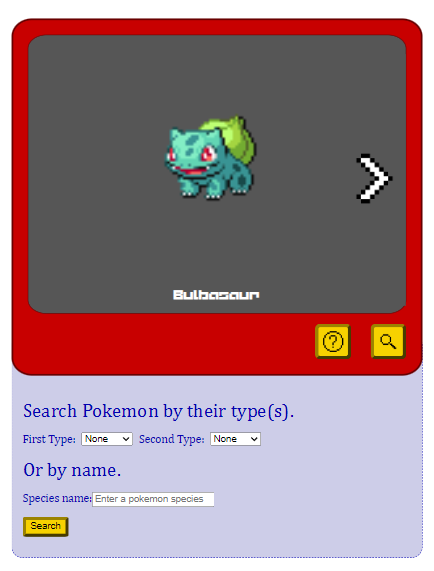
(A screenshot of the second version of the Pokedex.)
The app was intentionally designed with a simple, retrospective 1990s video game feel. To match the image sprites found in the API, I pixelated the navigation arrows and the font of the Pokemon species name.
The Pokemon are grouped in the order of their evolutionary lines. They are also listed in the same order as the official Pokedex.
Version 2.1 - May 2023
After some time, I felt that the app needed a cleaner and more modern appearance. Hence, I gave the overall style of the website a complete revamp. These changes included:
- Updating the color schemes for better visual appeal;
- Enhancing the layout by providing more spacing between elements, adjusting margins and padding, and resizing fonts for better readability;
- Styling the select and options elements as well as the inputs;
- Refining the design responsiveness for different screen sizes;
- Replacing the
alert()message with a more stylish pop-up error message for user notifications; and - Adding the ability to close the error message by clicking outside the message.
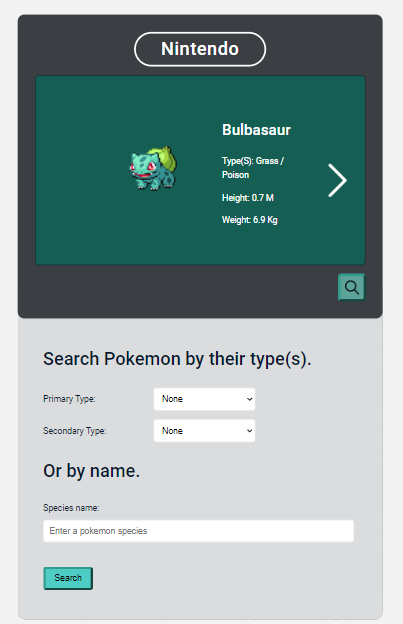
(Screenshot of the current version of the Pokedex.)
End Words
I have no intention to commercialize this project. This is simply a fun app I built in the hopes that it will also provide some entertainment value to users who have a nostalgic connection to this franchise. As an added bonus, the project has helped me familiarize myself with more advanced concepts of React and Redux.